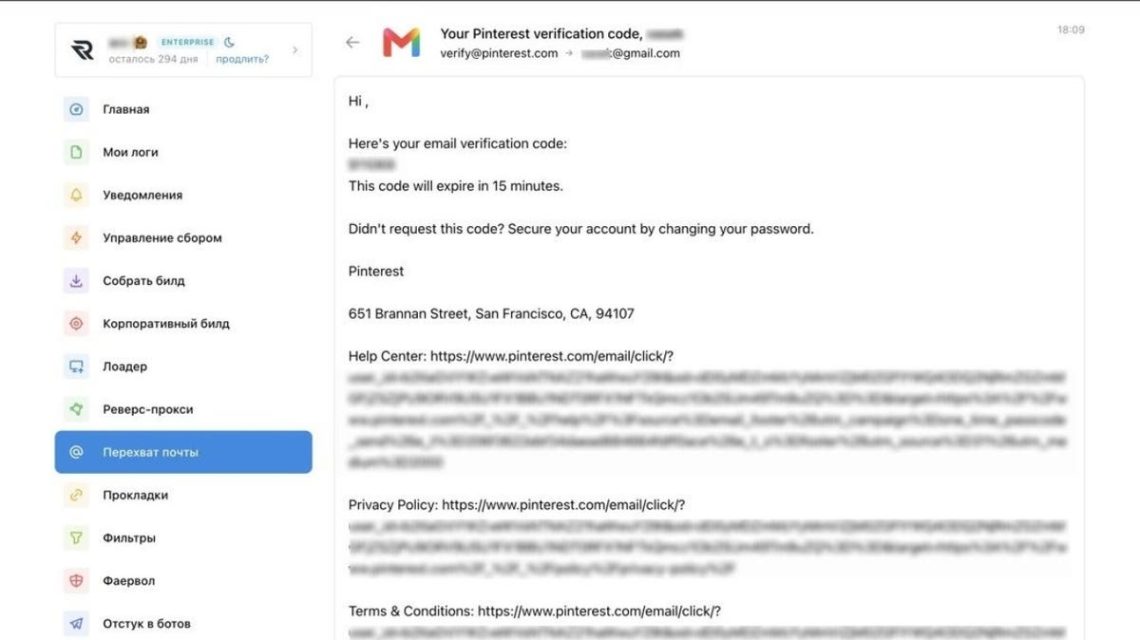
Changing your Gmail password might not be enough to protect your account from certain threats. A malware service named Remus Stealer claims it can access Gmail messages even after a password reset. These claims have raised concerns, though security researchers have not verified them independently, and Google disputes a direct vulnerability in Gmail.
The Remus Stealer Threat
Remus Stealer is marketed to cybercriminals who claim it can maintain access to Gmail accounts through infected devices. This malware supposedly allows continued access by targeting infected devices rather than exploiting Gmail directly.
According to researchers at Hudson Rock, promotional materials suggest that the malware’s new feature allows opening a compromised Gmail inbox. Screenshots show a Gmail interface on the malware’s dashboard. The developers claim changing passwords or revoking sessions won’t stop access.
The Reality of the Claims
Independent verification of these claims is limited. Hudson Rock contacted someone using the malware, but there wasn’t enough technical proof to confirm the claims. Also, the malware has not shown it can read new emails after securing an account properly. Without complete testing, these claims remain unverified.
Google’s Response
Google asserts there is no Gmail vulnerability involved. They emphasize these attacks target infected personal devices. The company advises users to remove the malware from devices and change their passwords using a separate, trusted device. Google constantly upgrades its defenses, including session protection to guard against unauthorized access.
Protecting Your Gmail Account
- Use antivirus software to scan and remove malware.
- Change your Gmail password from a trusted device after ensuring your computer is clean.
- Revoke unfamiliar sessions using Google Security Checkup.
- Verify forwarding rules and app permissions in Gmail settings.
- Enable Advanced Protection and 2-Step Verification for additional security.
Understanding Unauthorized Access
Session cookies and tokens are used to keep accounts logged in. Malware can target these to gain unauthorized access to Gmail without needing the password. Though Google can invalidate these sessions, protecting your computer from infection is crucial.
Warning Signs of Unauthorized Access
Be alert for unfamiliar Google security alerts or unexpected password reset emails. Missing emails, strange messages from your account, or changes to forwarding rules can also indicate unauthorized access.
Action Steps if Suspected of Malware Infection
- Disconnect suspected infected devices from the internet.
- Use trusted devices to run security checks and change passwords.
- Regularly update operating systems and browsers.
Maintaining strong, unique passwords and protecting devices is essential to safeguard your Gmail account. Understanding these threats and addressing malware effectively can prevent unauthorized access.
 AI Enhances Retail Efficiency for Black Friday and Cyber Monday
 Jensen Huang Resumes Leadership at Nvidia; AI Claims Solution to Riemann Hypothesis
 Utilizing AI for Holiday Shopping: Tips and Cautions
 Jensen Huang Returns and AI Tackles the Riemann Hypothesis
 U.S.-China Spy Allegations and Silicon Valley’s Reaction
 Heated Toilet Seats: Your Ultimate Guide to Comfort