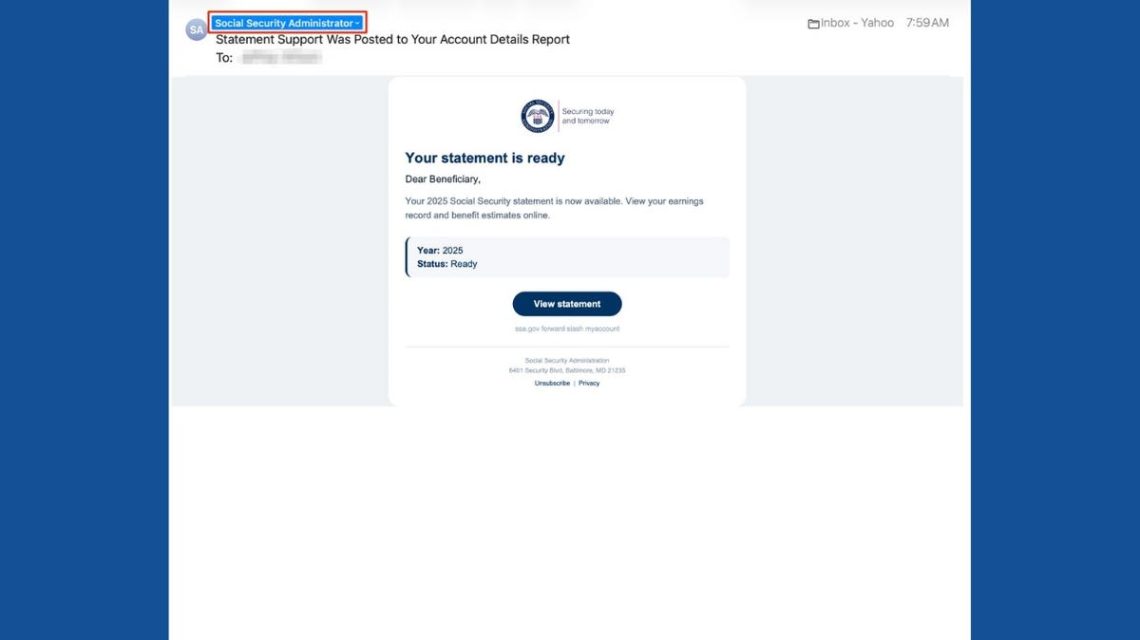
Emails claiming to be from Social Security might catch your eye, especially when they mention retirement benefits. Scammers use this to their advantage. They send emails that look official, promising to show your Social Security statement. However, these emails often come from suspicious addresses unrelated to the federal government.
Recent Warnings
In February, the Social Security Administration’s Office of the Inspector General highlighted a surge in such fraudulent emails. Recognizing these emails’ red flags is crucial to protect your personal information.
How the Scams Work
These fake emails often have subjects like “Statement Support Was Posted to Your Account Details Report” and appear to be from a “Social Security Administrator.” They mention your Social Security statement for 2025, displaying a button to view the statement.
“Dear Beneficiary, your statement is ready.”
It’s easy to mistake this for a genuine notification during a busy day.
Key Warning Signs
- Sender’s Email: The address may use domains like loradmiadministraciones.com, not ending in .gov.
- Unfamiliar Addresses: Legitimate SSA emails come from .gov addresses. Be wary of any deviations.
While the Social Security Administration sometimes partners with outside services for communication, unfamiliar domains can indicate scams.
Why the Scam is Convincing
The scam is deceptive because it looks professional, urging you to check your statement, something you might want to do naturally. The email lacks high-pressure tactics, making it even more believable.
Legitimate Social Security Emails
The SSA does send emails about statements to registered users. These typically arrive about three months before your birthday as reminders. Scammers take advantage of this by mimicking official emails.
Identify Real SSA Emails
- Check the sender’s full email address. Domain irregularities are red flags.
- Hover over links to see where they lead. Be cautious even if they seem to belong to SSA.
- Verify emails by visiting ssa.gov directly.
- Use trusted contacts from the official SSA website, not those in suspicious emails.
Protect Yourself from Social Security Scams
- Avoid unexpected links and documents. Access your SSA account independently.
- Use strong, unique passwords and multifactor authentication for accounts.
- Install and update reliable antivirus software.
- Never send sensitive information via email links.
- Review your SSA account regularly for unusual activity.
- Limit your personal data online to reduce scammers’ resources.
- Report suspicious emails to SSA Inspector General and delete after reporting.
What to Do If You’re Tricked
If you clicked the link but didn’t share sensitive information, exit the website and run an antivirus scan. If you input your password or shared personal details, change those passwords immediately and monitor accounts for unauthorized activity. Contact respective institutions if financial details are compromised.
Kurt’s Advice
Remain skeptical of emails claiming to be from Social Security. A quick check of the sender’s real address often reveals scams. Verifying through official channels rather than email links is always safer.
Have you encountered similar scams? To share your experience or for more insights, visit Cyberguy.com.
 OpenAI’s Hiring of Former Army Secretary Highlights Focus on Defense Projects
 OpenAI’s Discoveries and Public Reaction
 New York Enacts AI Companion Chatbot Restrictions to Protect Children
 Silicon Valley Faces Scrutiny from Democrats
 Anthropic’s SEC Filing Ahead of IPO Raises Unconventional Concerns
 Managing Microsoft Teams Status in Remote Work