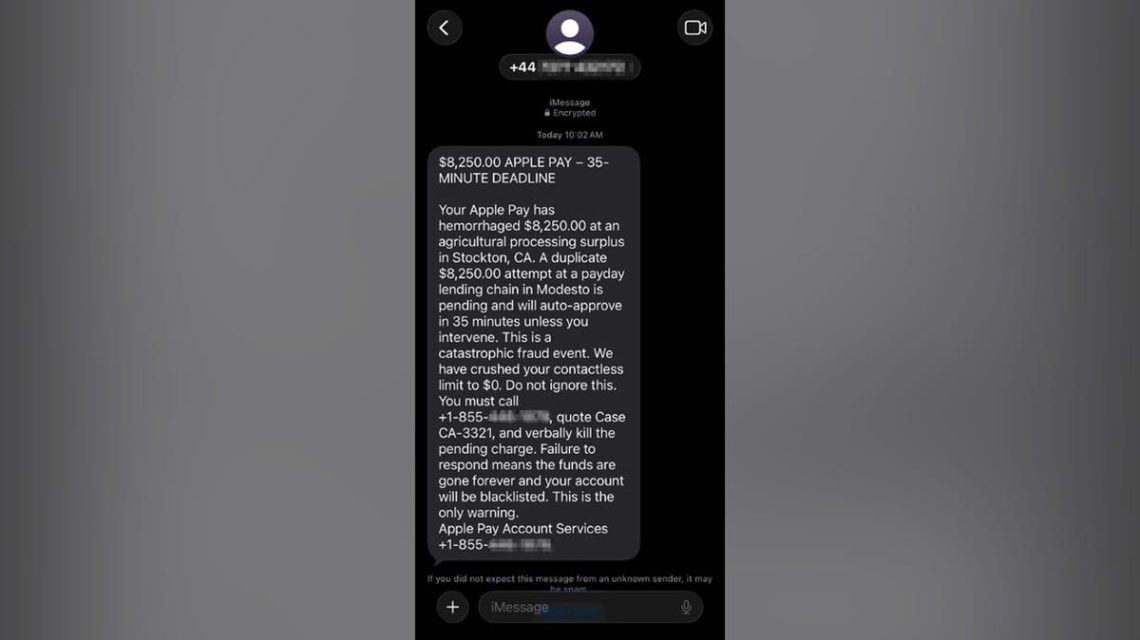
Paul C. in Washington, D.C., recently received a distressing text stating that Apple Pay had already charged him $8,250. It also warned another $8,250 charge would occur in 35 minutes. Such messages are crafted to induce panic.
Paul acted wisely by not responding to the number and forwarding the text for analysis. Let’s explore the warning signs of such scams and how to verify charges without falling prey to scammers.
CyberGuy Live Class on Financial Protection
Join the free CyberGuy LIVE class on defending against financial threats like AI scams and identity theft. The class will cover bank alerts, strengthening account logins, and securing your savings. Participants will receive a financial protection checklist and access to the class recording.
The Apple Pay Scam Paul Received
The scam text informed Paul of an unauthorized $8,250 Apple Pay charge, with another impending in 35 minutes. It instructed him to call an 855 number and provide a case number to halt the pending charge. The text exudes urgency and fear.
Identifying Red Flags in Scam Texts
- Mismatch of Numbers: The sender and callback number differed, suggesting suspicion.
- Apple Pay Branding: The use of Apple Pay’s name and “Encrypted” iMessage create false legitimacy.
- Panic-Inducing Charges: Claims of significant losses increase urgency and pressure victim response.
- Dramatic Wording: Phrases like “hemorrhaged money” are used to instill fear.
- Vague Merchants: Named locations are vague and do not align with real businesses.
- Contradictory Information: Conflicting claims about spending limits indicate deception.
- Single Solution Tactics: Insisting on calling the provided number indicates a scam.
How the Apple Pay Scam Functions
The text is a lure. Once called, the scammer might request personal account details or suggest installing a remote-access app. This could lead to financial theft under the guise of transaction security.
Verifying Apple Pay Charges
- Do not engage with numbers in suspicious texts.
- Check the Apple Wallet app for recent transactions.
- Consult your bank’s official app or the number on your card.
Reporting Fake Apple Pay Messages
- Screenshot the message including sender details.
- Report it as spam or junk in your message app.
- Block the sender and delete the message.
- Email screenshots to [email protected].
- Forward spam texts to 7726 (SPAM).
- Report to the FTC at ReportFraud.ftc.gov.
If You Have Called the Number
If you have inadvertently engaged with the scam, take immediate steps based on the details shared:
- If Called Only: Block the number and monitor for further contact attempts.
- If Financial Details Shared: Contact your bank via a trusted method to secure accounts.
- If Verification Codes Shared: Alert services immediately and change affected passwords.
- If Remote Software Installed: Disconnect from internet, remove the software, and perform a security scan.
Preventive Measures Against Future Scams
- Take Your Time: Do not rush. Verify messages via secure channels.
- Do Not Share Codes: Never disclose verification codes over the phone.
- Use Security Software: Employ antivirus tools to thwart potential threats.
- Reduce Data Exposure: Use services to remove personal data from public domains.
- Report Suspicious Messages: Help authorities identify scam patterns by reporting threats.
Lessons from Paul’s Experience
This scenario introduces fear through large charges and tight deadlines. However, verifying independently and not following the scam’s script is crucial. Communicate through reliable channels and do not provide verification codes.
Have you encountered similar scam attempts? Share your story with us at CyberGuy.com to enhance awareness.
 Concerns Rise Over AI Development and Geopolitical Implications
  Impact of E.U. Regulations on Google Search
  Discovery of Massive Lunar Crater Sheds New Light on Moon’s Surface
  Concerns Rise Over AI Chatbot Safety, Legislation Faces Criticism
  Trump Announces Plan for AI Force and Czar Amid AI Regulation Debate
  US Faces Challenges in AI Competition with China