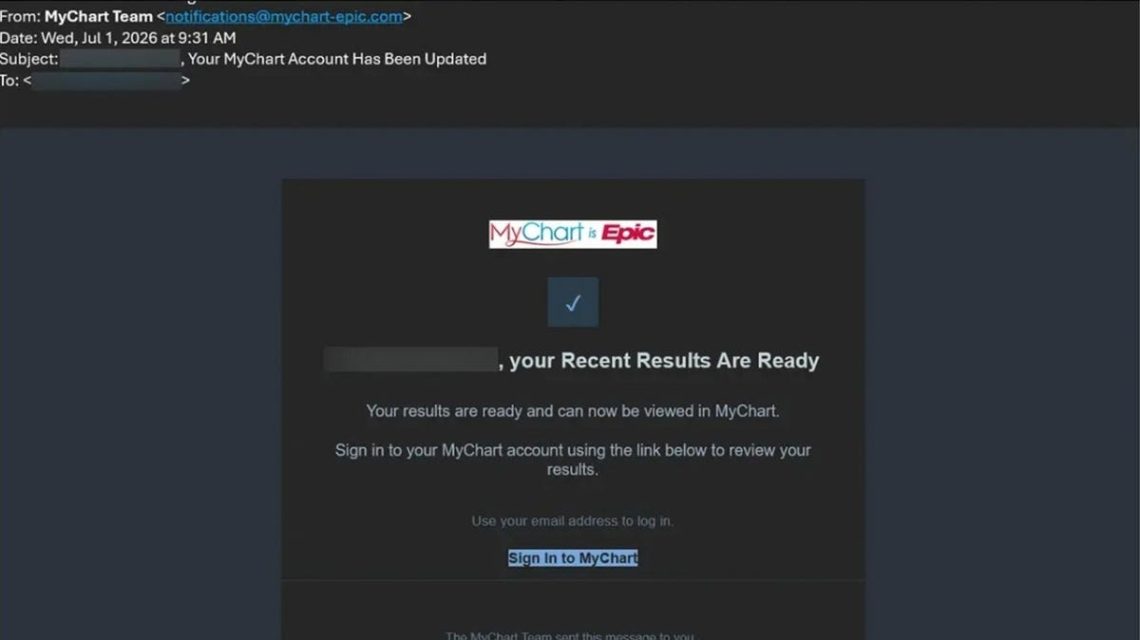
If you’ve checked lab results or messaged your doctor online, you’re likely familiar with MyChart. This Epic patient portal gives patients electronic access to their health information and care teams. With increasing reliance on portals, the topic is attracting attention, especially when scams target MyChart users.
The Nature of MyChart Phishing Scams
Phishing scams impersonate MyChart by using fake medical results and bogus Medicare offers to manipulate trust in patient portals. Scammers aim to extract sensitive details by mimicking MyChart’s interface. Epic Systems Corporation has revealed methods such as malware introduction on Windows computers and stolen login data.
Why MyChart Phishing Scams Are Gaining Attention
Warnings have emerged concurrently from notable sources. On Aug. 26, 2026, Penn Medicine announced a nationwide scam involving emails and texts pretending to originate from MyChart. Two days later, Pennsylvania Attorney General Dave Sunday alerted the public about an impersonation scam promising fake Medicare kits.
Identifying the Scam Process
The scams often appear as routine messages with MyChart branding, telling users their results are ready. Clicking a button in these emails leads to a fake sign-in page, fabricated to look genuine. This webpage requests login credentials, which scammers capture for further exploitation.
Once logged in, victims are faced with false medical records, leveraging fear with claims of critical blood work patterns identified through fictitious AI reviews. This alarmist tactic encourages immediate user action, highlighting a verification step likely to install malware on Windows machines.
Recognizing Another Scam Variant
Another phishing approach involves offering a free Medicare Health Kit, enticing victims with non-existent giveaways. A hurried process concludes with a request for a shipping fee and personal data, eventually gathering credit card information for non-shipping items.
Steps for Avoiding MyChart Phishing Scams
- Manually Access MyChart: If you receive a notification, do not use any included links. Go directly to the MyChart app or your provider’s official site.
- Inspect Sender Addresses: Verify email origins by checking full sender addresses for discrepancies with previous legitimate communications.
- Avoid Executing Commands: MyChart will never request command inputs or keyboard shortcuts for verification. Beware of sites suggesting otherwise.
- Implement Two-Step Verification: Enhance security with two-step verification (2FA) to protect against compromised passwords.
- Create Unique Passwords: Use unique passwords for MyChart to prevent potential ripple effects from phishing incidents.
- Maintain Security Software: Regularly update antivirus software to safeguard against malware threats.
- Verify Serious Medical Claims: Authenticate urgent medical messages with your care team directly before taking action online.
- Limit Personal Information Exposure: Reduce available personal information online through data removal services.
- Avoid Phony Giveaways: Be skeptical of emails promoting gifts under MyChart’s name, as Epic does not conduct prize offers.
Actions to Take After Interacting with Fake Links
- If Information Was Not Entered: Avoid further site interaction and mark the email as junk.
- If Your Password Was Shared: Update your password through MyChart’s official site and verify stored contact information.
- If You Entered Credit Card Details: Contact your card issuer immediately to report the fraudulent site and enquire about replacing the card.
- If Commands Were Executed: Disconnect from the internet, perform a security scan and update passwords from a secure device.
MyChart offers efficient communication with healthcare providers. Despite malicious attempts using its name, users can continue to benefit from MyChart by being cautious with email alerts and taking protective measures.
 Allegations of Surveillance by Former OpenAI Engineer with Saudi Connections
  Accountability Beyond the Criminal Legal System
  Maintaining Healthy Knees Throughout Life
  Lash Technician Battles Hodgkin Lymphoma: A Journey and New Beginnings
  Titan’s Journey from Hearing Loss to Laughter: A Heartwarming Transformation
  Study Links Epilepsy with Higher Dementia Risk Before 65